Passwords have long been used to access the digital world, but frequent reuse and increasing phishing attacks are making them less reliable, leading to the development and adoption of more secure alternatives. One such alternative is passkeys, which offer a more secure way to log in to online services.
Passwords are vulnerable
A password is a secret word or phrase that you use to prove who you are to computer systems and/or online. CyberNews report identified that in years 2024 to 2025 94 % of 19 billion leaked passwords were re-used.
Passwords are also vulnerable to phishing, which is when scammers trick you into typing your password (or other information) into a fake account login page. Phishing emails continue to grow in number and consequence. The Phishing Statistics Report 2025: AI-Driven Attacks, Costs & Trends indicates, that over 3 billion phishing emails are sent globally each day. You can read more about how quickly data abuse can happen here.
What are passkeys and why they are stronger than passwords?
Passkeys first started to emerge roughly four years ago. They use a mathematical process called public-key cryptography to create a unique set of information that is split into two parts – or keys.
Each passkey is unique for every service you use; even if the key for a site could be stolen, it cannot be used elsewhere.
Passkeys are also more convenient than passwords. You don’t have to look for the password you used when you registered – the passkeys are already linked to your device.
Passkeys are resistant to phishing. From a user perspective, there isn’t a password to send in response to a phishing email. A request to log in on a site must come from the registered device combined with the approval of the user.
How do passkeys work?
One key is public and can be shared with websites; the other is a private key that is stored securely on your device. To sign into an account, the website sends a random challenge (such as a number) and your device uses the private key to “approve” the login request. This approval is usually called “signing” the request and applies a mathematical process to the challenge.
Your device won’t just do this automatically; you will typically be required to approve the request. For many mobile devices this will require your face or fingerprint to be used to authorise the response to be sent.
Finally, the website checks the signature via the public key it already has. If it confirms the challenge, you are in.
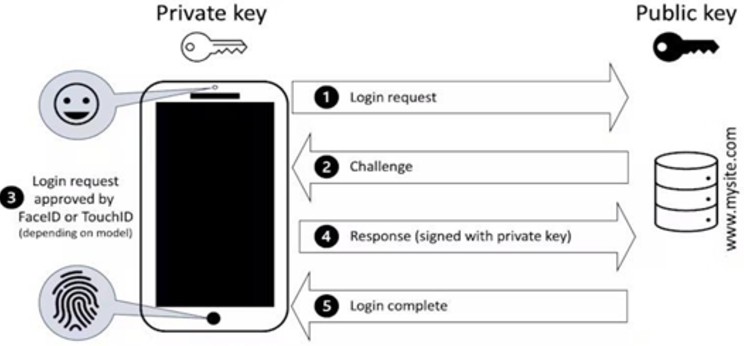
Source: Paul Haskell-Dowland (Edith Cowan University) in Ismini Vasileiou (De Montfort University) – The Conversation
At Rekono d.o.o. we provide strong two-factor authentication with a Rekono account, which also supports a modern passkey login mechanism. You can read more about this here.